
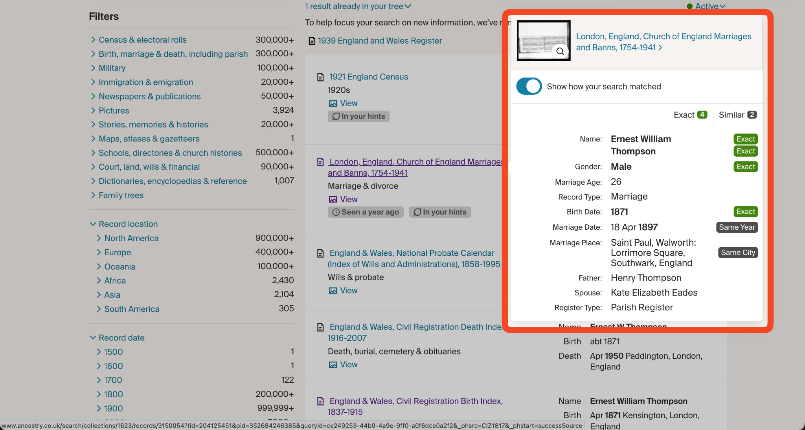
Ancestry is one of the best-known online resources for family history research, providing access to a vast collection of historical records, family trees and other material that can help you discover more about your ancestors.
However, getting the best out of Ancestry involves more than simply entering a name into a search box. Understanding how its search tools work, providing accurate information about your family and checking suggested matches carefully can make your research considerably more productive.
Here is a guide to getting started and making better use of Ancestry’s main research features.
Getting to Know Ancestry
Ancestry is a commercial genealogy company with a large collection of historical records covering many countries and periods. Its resources include census returns, birth, marriage and death records, military records and many other sources useful to family historians.
The wider Ancestry group also includes several other genealogy-related services:
- Newspapers.com – a collection of digitised newspapers.
- Find a Grave – a resource for locating graves and memorials.
- Fold3 – a collection specialising in military records.
- RootsWeb – a genealogy community and resource for family historians.
The availability of individual records and services varies, and some resources require separate access arrangements.
Make sure you use the correct website
If you are researching your British family, start at ancestry.co.uk.
Ancestry operates country-specific websites, and the version you use can affect the way you approach your research. Although records from other countries may also be available, beginning with the UK site is a sensible starting point for research into British ancestors.
Getting Your Family Tree Started
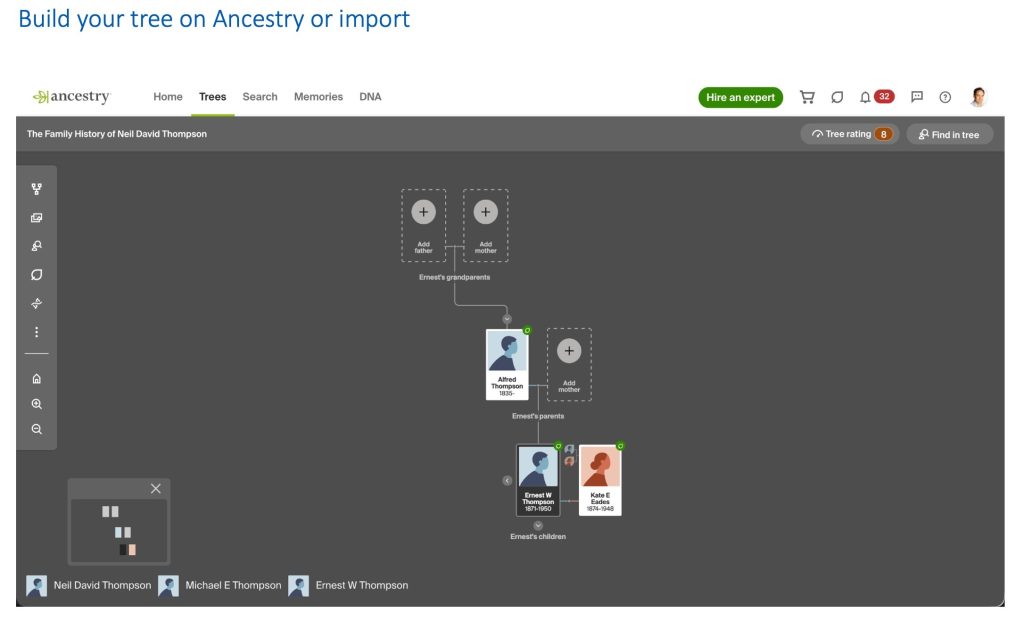
One of the most useful features of Ancestry is the ability to build a family tree and connect people to historical records.
You can create a tree directly on Ancestry or import an existing tree, allowing you to continue research without necessarily having to start again from scratch.
Start with what you know
Before searching for distant ancestors, make sure you have entered the information you already know about your family.
Include yourself, your parents, grandparents and great-grandparents wherever possible. Add accurate dates and places of birth, marriage and death, along with other details you have established through your research.
This information provides a useful foundation for Ancestry’s search tools and hint system. The more reliable information you supply, the easier it becomes to distinguish your ancestors from other people with similar names.
Three generations can provide a useful starting point, but do not worry if you cannot complete every branch. It is better to record what you know accurately than to fill gaps with guesses.
A good rule is to record evidence, not assumptions. If a date or relationship is uncertain, make a note of that uncertainty rather than treating it as established fact.
Choose your tree’s privacy settings
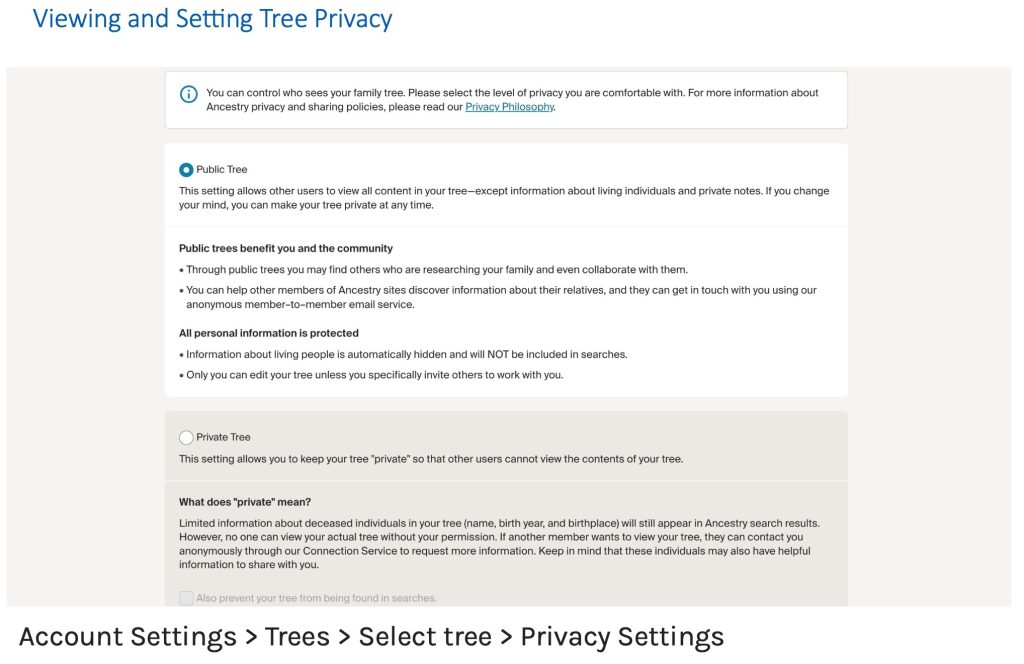
When creating a family tree, consider who should be able to see it.
Ancestry provides different privacy options, including public and private trees. A public tree can be discovered by other researchers, while a private searchable tree keeps its details hidden from public view but allows other users to find your ancestors’ names in searches and contact you to request access.
You can review your tree settings through the account settings area, under Trees and the relevant tree’s Privacy Settings.
Think about the information you are sharing, particularly when it concerns living relatives. A public tree can encourage collaboration and help other researchers discover shared ancestors, but privacy should always be considered.
Searching for an Ancestor
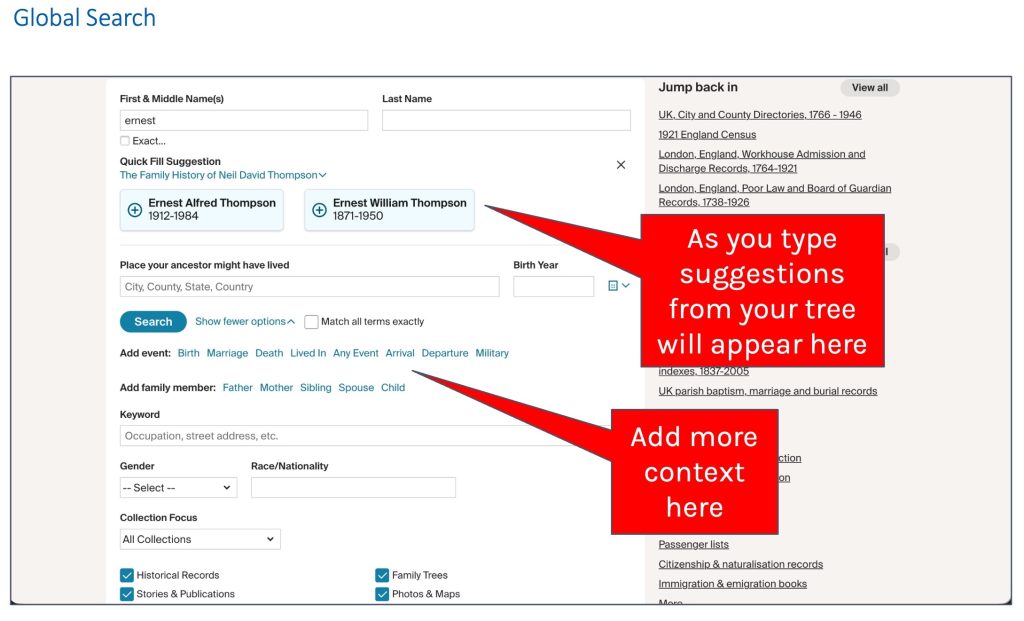
Ancestry’s general search is a convenient place to begin looking for a person in its historical records.
You can usually enter a name, an approximate date and a place associated with an event. However, there is an important point to remember: Ancestry’s search is designed to be flexible, so results may match only some of the details you enter.
If you search for a person with a common name, you may receive thousands of possible matches. Some may be relevant, while others may relate to entirely different people.
The key is to provide useful context and then assess the results systematically.
1. Start with the name and an approximate date
Enter the person’s name and, where known, an approximate year of birth or another relevant event.
Do not assume that the date in a historical record will be exact. Ages were sometimes recorded incorrectly, and information supplied by relatives or officials could contain errors.
If you cannot find the person using an exact date, try a broader range rather than immediately concluding that the record does not exist.
2. Use places to narrow the search
Locations are particularly valuable when researching people with common names.
Start with a county, town or parish rather than a precise street address. Historical records may use different descriptions for the same place, and an ancestor may have moved between neighbouring parishes or registration districts.
A broad geographical search can help you find possible matches that a very restrictive search would exclude.
Once you have a promising result, you can narrow the search using more specific information.
3. Add family members
One of the most effective ways to distinguish between people with the same name is to include information about their relatives.
Depending on the search form, you may be able to add the first names of a father, mother or spouse.
For example, if you are researching a John Smith, a search that includes his wife’s name or his father’s name may be much more useful than one based on his name alone.
Family relationships can help you decide which records are worth investigating further, although they should still be verified against the original evidence wherever possible.
4. Use the keyword field carefully
The keyword field can be useful when searching for particular occupations, military details or other identifying information.
Examples include occupations such as blacksmith or agricultural labourer, or a regiment number when researching military service.
However, not every record will contain the information you enter. If a search produces no useful results, try removing the keyword and searching again.
A restrictive search can sometimes exclude the very record you are hoping to find.
Understanding Search Results
Once you submit a search, Ancestry presents a list of possible matches. Learning how to interpret this list is an important part of effective research.
Check what the record actually says
Do not select a record simply because the name and date look right.
Compare the available details with what you already know about the person. Consider the location, age, relatives and other identifying information.
Ask yourself whether the record fits the established family history or whether it introduces contradictions that need investigating.
Where available, open the record to see more detail rather than relying solely on the brief summary displayed in the results.
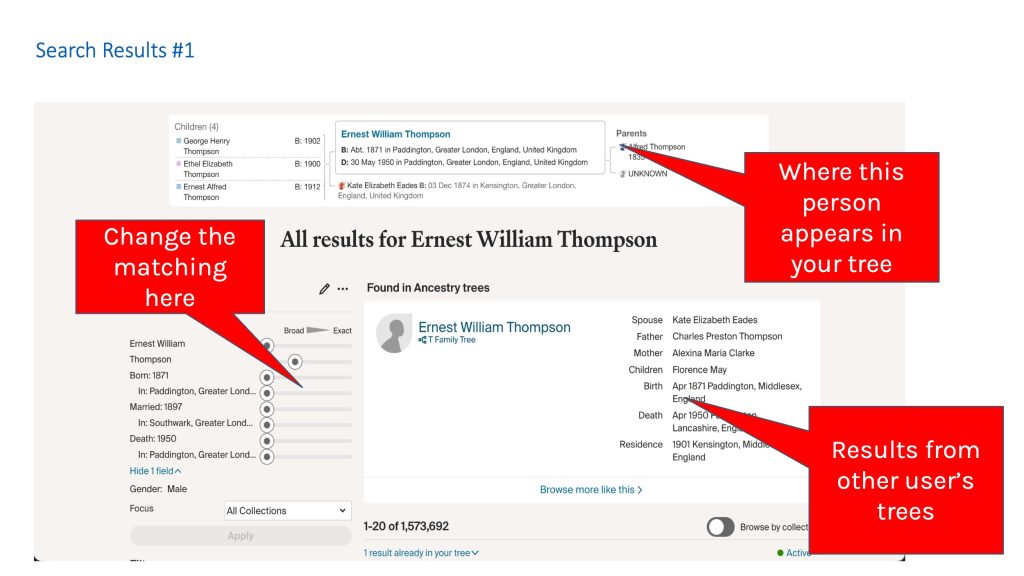
Use the filters
Ancestry provides filters to help narrow search results. Depending on the search and record collection, these can help you focus on particular record types, dates, places or other relevant details.
If you have thousands of results, applying a suitable filter may make the list much easier to work through.
It is worth experimenting with different combinations. If the results become too narrow, remove a filter and try again.
Look beyond the first result
The first result is not necessarily the correct one.
Work through the most promising matches, comparing the information they contain with your existing research. An apparently less obvious result may prove more useful once you examine the details.
Also remember that a record may contain an error. A discrepancy does not automatically rule out a match, but it does mean you need to investigate further before reaching a conclusion.
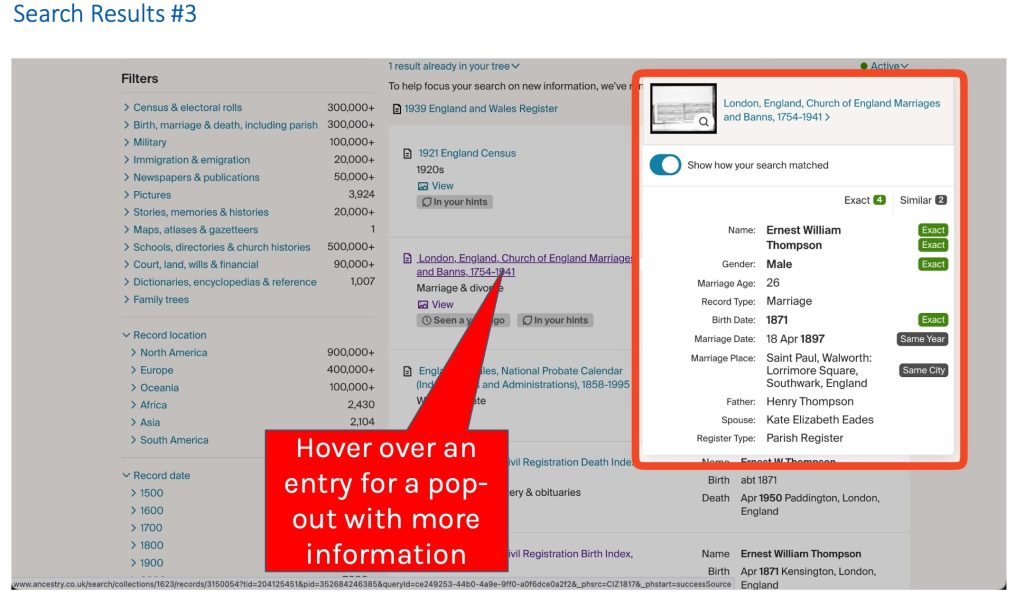
Be particularly cautious with other people’s family trees
Search results may include information from trees created by other Ancestry users.
These can be valuable research leads, especially when another researcher has discovered a family connection you have not yet found. However, a family tree is not the same thing as a historical record.
Another researcher may have made an incorrect assumption, copied an error from elsewhere or attached a record to the wrong person. That error can then be repeated in numerous other trees.
Treat other people’s trees as clues to investigate, not as proof of a relationship.
Whenever possible, find the underlying record and assess what it actually establishes.
Searching the Card Catalogue
Ancestry’s general search is useful when you want to explore a broad range of records. Sometimes, however, it is better to go directly to a particular collection.
This is where the Card Catalogue becomes useful.
The Card Catalogue allows you to browse the collections available on Ancestry and select one that is relevant to your research.
How to use the Card Catalogue
- Open the Search menu.
- Select Card Catalogue.
- Browse the available collections or apply filters to narrow the list.
- Select a relevant collection.
- Enter your search details within that collection.
The catalogue includes collections covering different places, periods and types of record. The exact collections available will depend on Ancestry’s holdings and your access.
You can often hover over a collection in the results list to see additional information about it before opening it.
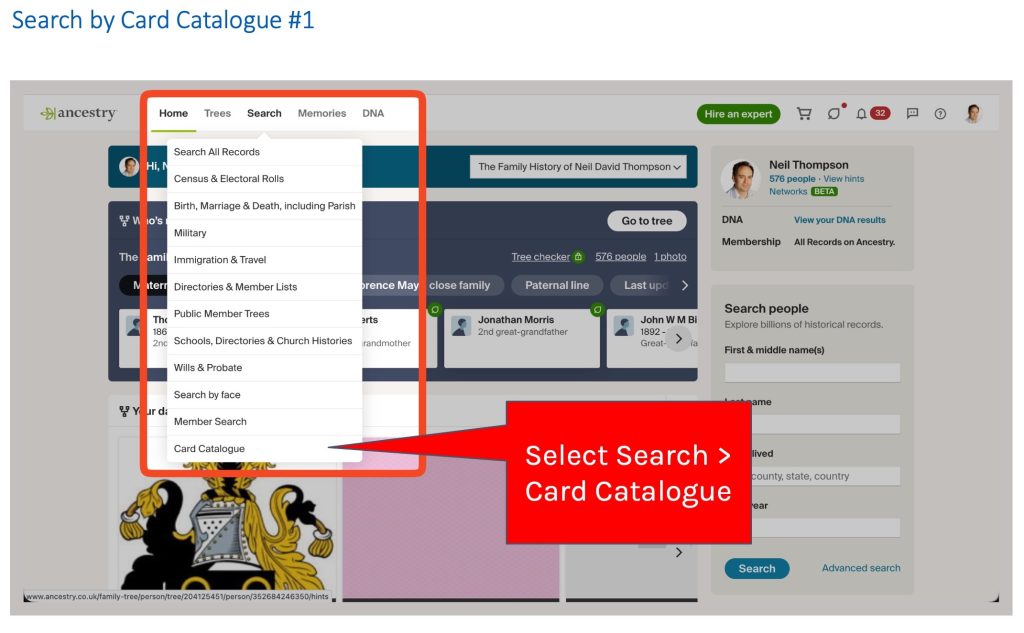
Why search a specific collection?
Suppose you are researching an ancestor who lived in a particular period and you want to investigate a specific census or military record collection.
Searching that collection directly can help you focus on the records most likely to contain relevant information, rather than sorting through results from a wide variety of sources.
It also encourages you to think about the historical records that might answer your research question.
If you are looking for an ancestor’s occupation, for example, an appropriate census or employment-related record may be more useful than a broad search across unrelated collections.
The Card Catalogue is therefore worth exploring whenever a general search is producing too many irrelevant results or you already know which type of record you need.
Making the Most of Ancestry Hints
One of Ancestry’s best-known features is its hint system, often represented by a leaf icon.
Hints are suggested records or other information that Ancestry believes may relate to someone in your family tree. They can reveal sources you might not otherwise have considered and help you identify new avenues for research.
However, a hint is a suggested match, not a confirmed fact.
Where to find hints
You can access hints through the leaf icon in the main navigation area or from within your family tree.
Selecting a person and viewing their hints allows you to review the suggestions associated with that individual.
The hints page presents possible matches for you to examine. You can then decide whether a record really belongs to the person you are researching.
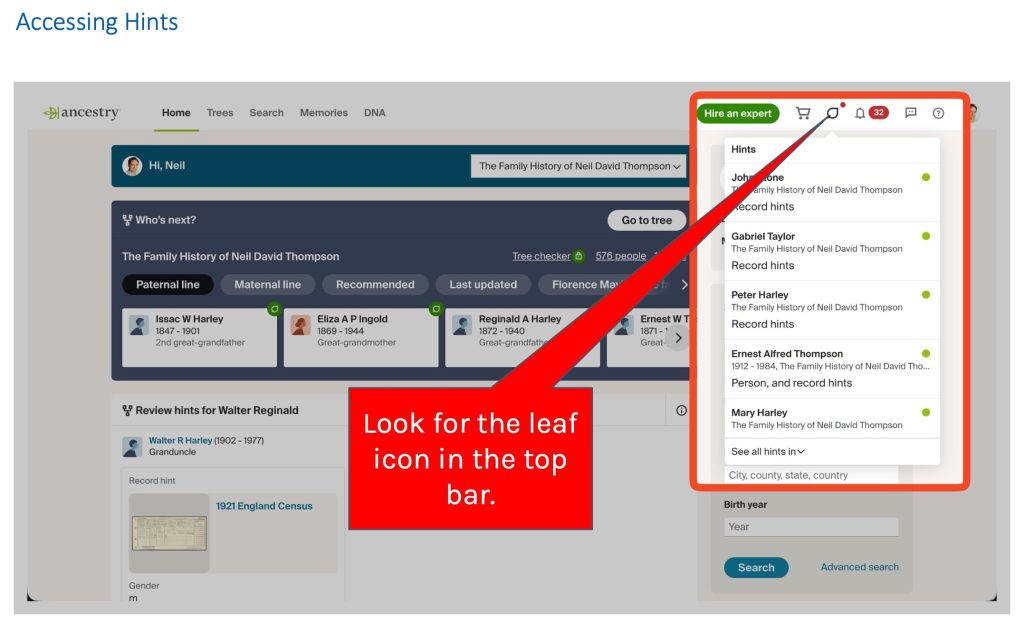
Examine every hint carefully
Before accepting a hint and attaching it to your tree, compare the information in the suggested record with the details you already know.
Consider the following questions:
- Does the name match, allowing for spelling variations?
- Is the date plausible?
- Does the location fit what you know about the person’s life?
- Are the named relatives consistent with your research?
- Does the record provide useful new evidence, or does it contradict something already established?
No single detail is necessarily decisive. A matching name may be encouraging, but a matching name, date, location and set of family relationships provides a much stronger basis for considering a record relevant.
If the evidence is ambiguous, leave the hint unconfirmed while you investigate further.
Hints from other people’s trees need extra care
A suggested record and a suggested family-tree connection are not the same thing.
A historical record may provide direct evidence of a birth, marriage, residence or other event. A tree created by another user may simply repeat that person’s interpretation of the evidence.
If a hint suggests a new parent, spouse or child, look for records that support the relationship before adding it to your own tree.
It is much easier to maintain an accurate family tree when you take the time to verify each connection than to correct a chain of mistaken relationships later.
A Few More Search Tips
If your research has reached a dead end, a change of approach may help.
Try alternative spellings. Names were not always recorded consistently. A surname may have several spellings, and handwriting or transcription errors can make a record difficult to find.
Broaden the date range. An age or date may have been recorded incorrectly. Searching a wider period may reveal a promising record that a narrowly defined search misses.
Vary the location. Consider neighbouring parishes, registration districts or counties, particularly if the family moved or the geographical boundaries changed.
Remove unnecessary search terms. Too many restrictions can exclude relevant records. Begin with the most reliable details and add further information as needed.
Investigate the original record. A search result or transcription is a useful starting point, but the original image may contain additional details or reveal a transcription error.
Keep track of your evidence. Record where you found each fact and why you believe it relates to your ancestor. This makes it easier to revisit an uncertain conclusion when new information becomes available.
Bringing It All Together
Ancestry offers family historians a great deal of information, but the quality of your research depends on how you use it.
Start with an accurate family tree, make sensible use of dates and locations, and add family members to searches when they can help distinguish between people with similar names. Use the Card Catalogue when you want to focus on a particular collection, and treat hints as opportunities to investigate rather than answers in themselves.
Above all, remember that finding a record is only the beginning. The important work is establishing whether that record really belongs to your ancestor and understanding what it can tell you about their life.
By combining Ancestry’s search tools with careful evaluation of the evidence, you can build a family history that is not only more complete, but also more reliable.
Useful link: Ancestry UK